December 12, 2025
Mastering n8n Workflows: Automation Made Easy
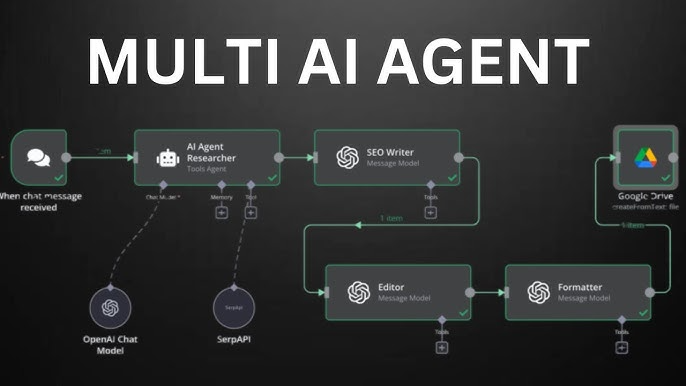

Mastering n8n Workflows:
Automation Made Easy
n8n is rapidly gaining momentum as a powerful, extendable workflow automation tool for creators, businesses, and developers. If you’ve been looking to automate repetitive tasks, integrate with your favorite services, or simply streamline your processes—this guide has you covered. Dive in as we explore n8n workflows, best practices, hands-on examples, and how to supercharge your setup with reliable hosting.
- n8n offers visual, code-optional workflow building with 250+ integrations.
- Easily automate across cloud apps, blockchain, data tools, and custom APIs.
- Self-host for data control and scalability—ideal with fast, stable cloud hosting.
- Flexible nodes and triggers enable both simple and advanced automations.
What Are n8n Workflows?
At its core, an n8n workflow is a sequence of steps ("nodes") that automate tasks between various apps or services. Unlike many no-code tools, n8n balances visual ease with technical power—allowing both drag-and-drop builders and low-code customizations from community-inspired examples.
How It Works
- Trigger Node: Start your workflow (e.g., when a new form is submitted or a webhook is called).
- Action Nodes: Send data, process files, connect APIs, or orchestrate logic between steps.
- Conditions/Branches: Use If/Else logic, data splits, and error handlers for robust flows.
Why Automate With n8n?
- No vendor lock-in: Self-host anywhere with open-source license.
- Connect multiple services: CRM, email, crypto, spreadsheets, databases, and more.
- Visual editor: Intuitive drag, drop, and configure system.
- Scalable: Easily expand from a tiny script to enterprise-wide automations.
- Vibrant community: 1000s of ready-made workflow ideas and templates.
Popular Workflow Examples
Explore some creative and practical n8n workflows you can run:
- Automatically send daily reports from Google Sheets to Slack.
- Sync data between Airtable and Notion.
- Monitor a website’s uptime and receive an email if it goes down.
- Auto-post new Twitter mentions into a Discord channel.
“The beauty of n8n is you can start simple—and build endlessly. The only limit is your imagination.”— n8n Community User
n8n vs. Other Workflow Automation Tools
| Feature | n8n | Others (e.g. Zapier, Make) |
|---|---|---|
| Hosting | Cloud & self-host | Cloud only |
| Pricing | Free / open-source | Paid subscriptions |
| Integrations | 250+ (growing) | 2500+ (but less customizable) |
| Custom code | Low-code friendly | Limited/None |
| Data privacy | Full control (self-host) | Data on third-party servers |
Best Practices for Your Workflows
- Label every node descriptively for easy updates.
- Use the "Execute Workflow" node to organize reusable automation building blocks.
- Test workflows with sample data before going live.
- Remember error handling—add fallback paths!
Self-Hosting? Supercharge n8n on PinnacleServer
Try PinnacleServer—Fast Hosting for n8n Deployments
- One-click Docker & n8n support
- Reliable uptime and speedy SSD storage
- Global locations for latency-free automations
- Flexible pricing—pay only for what you need
n8n Workflow FAQ
Yes! n8n is an open-source project—you can self-host for free. Advanced cloud plans add enterprise features.
Just deploy n8n to the cloud, a VPS, or even a local computer. Try affordable hosting for fast releases.
Absolutely. Many teams run complex automations with n8n, controlling sensitive data and scaling as needed.
Check out n8n’s workflow community for templates, guides, and inspiration.
Launch enterprise-grade n8n in seconds, at the best price.