December 12, 2025
n8n Workflows: Automate Like a Pro – The Complete Guide
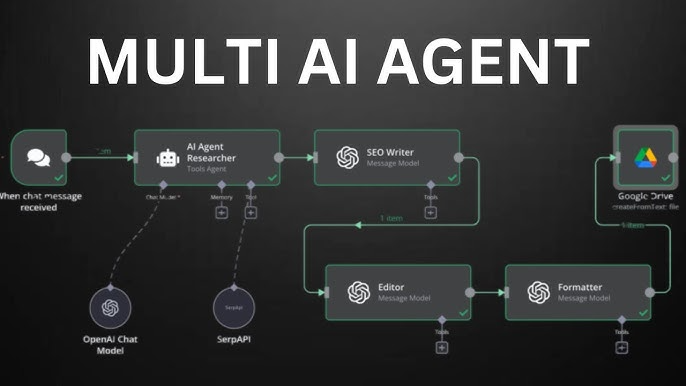

n8n is transforming how businesses and developers automate repetitive processes. With its low-code, open-source platform, creating complex workflows is easier than ever. Wondering how to unlock its potential? Let’s dive into building, customizing, and mastering n8n workflows for superior productivity.

Key Takeaways:
- n8n offers modular, visual workflow automation for technical & non-technical users.
- Hundreds of built-in integrations and a powerful node-based editor.
- Self-host or choose managed solutions for advanced scaling.
- No-code logic, conditions, and custom HTTP/Webhook triggers.
- Perfect for team automation, data pipelines, SaaS, & more!
What Are n8n Workflows?
n8n workflows are visual sequences of logic, triggers, and actions created inside n8n’s intuitive canvas. Each workflow can connect different apps, transform data, automate manual tasks, and launch custom logic almost anywhere.
Core Elements of an n8n Workflow
- Nodes: Small blocks that perform triggers, logic, or actions.
- Connections: Flows of data between nodes to create your process.
- Conditions & Branching: Logic gates for IF/ELSE and looping.
- Integrations: Built-in support for Google Sheets, Slack, APIs, email & more.
“With n8n workflows, your business logic evolves visually — no more silos, no more manual bottlenecks. It's automation, unleashed.”
How to Build Your First Workflow
- Open n8n.io Workflows and browse real-world examples.
- Start a new workflow in your n8n instance (cloud or self-hosted).
- Add a Trigger node (Webhook, Schedule, or Events) to start execution.
- Connect action nodes (Send Email, API Access, File Upload, etc.).
- Preview and test each step visually using the Execution log.
- Iterate: Add error handling, conditionals, and advanced integrations.
- Save, name, and activate your workflow — automation begins instantly!
Tips for Advanced Automation
- Use custom code nodes for JavaScript logic when needed.
- Leverage environment variables for dynamic, scalable workflows.
- Group related nodes with Sub-workflows for better organization.
- Build error branches to catch failures automatically.
n8n Workflows
- Visual node editor – Easy drag-and-drop
- 400+ integrations – Custom API & SaaS ready
- Self-host for privacy & compliance
- Fully open-source, extendable design
- Active community & workflow sharing
Traditional Automation Tools
- Code-heavy, less visual editing
- Limited integrations
- Often proprietary/expensive
- Restrictive vendor lock-in
- Fragmented sharing & support
Why Host n8n Yourself?
Running n8n on your own hosting unlocks the full power of control, data privacy, and limitless scalability. Don’t settle for limitations — unleash your automation potential today.

Supercharge Your Automation!
Get blazing-fast, secure n8n hosting with Pinnacle Server. Zero hassle, maximum power.
See Hosting Plans →
See Hosting Plans →
n8n Workflows FAQ
Is n8n suitable for non-developers?
Absolutely. The drag-and-drop canvas is designed for all technical levels. Many successful workflows are built by non-technical users.
What kinds of apps can I connect with n8n?
n8n supports 400+ apps: SaaS, APIs, CRM, databases, chat, webhooks, and many more – plus custom endpoints.
Can I share or import workflows from others?
Yes. You can copy, share and import workflows in n8n’s JSON format. The n8n Workflows gallery offers hundreds of community blueprints.
Is hosting n8n complicated?
Not with the right provider! Get fast, tailored hosting with Pinnacle Server to start automating instantly, no infrastructure headaches.