December 12, 2025
The Power of n8n Workflows: Automate Anything with Ease
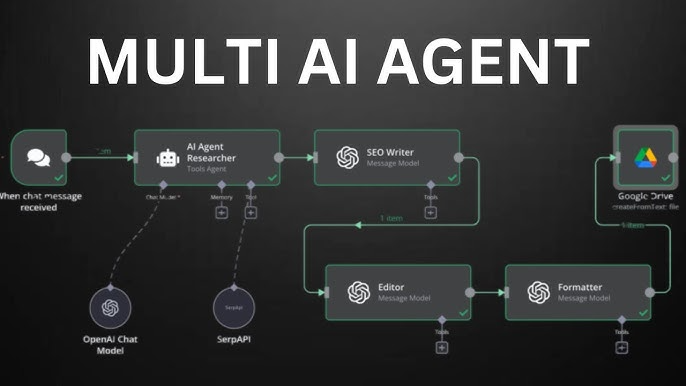

Are you tired of repetitive tasks taking up your time? n8n is a groundbreaking workflow automation tool that enables you to automate anything, from simple tasks to complex business processes — with zero code. Whether you're a solo founder, a developer, or just someone curious about automation, this guide covers how n8n workflows can transform your productivity.
- n8n offers customizable, flexible automation for everyone
- Integrates with 400+ platforms & services
- No coding required — drag, drop, connect
- Open-source & self-hostable for total control
- Community-driven with hundreds of pre-built workflows
What is n8n?
n8n is an open-source workflow automation tool. It lets you connect different services (APIs, apps, databases) and automate repetitive processes using a powerful visual interface. Think of it as your personal digital assistant, running tasks while you focus on what matters most.
Why Choose n8n Workflows?
- Endless Integrations: Connect with 400+ apps from Gmail, Slack, and Google Sheets to Notion and APIs
- Visual Builder: Drag-and-drop blocks make workflow design intuitive
- Open Source: Unlike Zapier or Make, you control your data and security
- Self-host or Cloud: Run on your server or choose a managed solution
- Community Workflows: Explore popular pre-built workflows for instant automation (see n8n Workflows Gallery)
How Do n8n Workflows Work?
The magic of n8n lies in its nodes. Each node represents a task, trigger, or action. You link nodes together in a sequence (your workflow), connecting triggers to actions. For example:
- Email arrives in Gmail (trigger)
- Extract and parse email information
- Create a Trello card or add a database entry (action)
No code is necessary. Just build, test, and deploy!
"I set up an n8n workflow to track leads and automate follow-ups. It saved me hours every week!" — Satisfied User
Popular n8n Workflow Examples
Automatically post updates to multiple social platforms when you publish a new blog.
Sync leads from contact forms to Google Sheets, Notion, and your CRM in real time.
Scrape websites for new content, alert your team via Slack or email with instant notifications.
Explore more ready-to-use workflows in the official n8n Workflows Gallery.
n8n vs Other Automation Platforms
n8n
- Open-source & self-hostable
- Unlimited workflows
- Advanced logic, code, and HTTP support
- No vendor lock-in
Zapier / Make
- Proprietary (closed source)
- Pay-per-task limits
- Less flexibility for advanced logic
- Data stored in 3rd-party cloud
Getting Started with n8n
- Sign up or self-host: Start with n8n Cloud or deploy locally.
- Connect your apps: Add integrations for Gmail, databases, CRMs, and more.
- Build your first workflow: Use the drag-and-drop editor or try a community template.
- Test & schedule: Run automations manually or on schedules, triggers, webhooks, etc.
Best Practices & Tips
- Start small: Automate a single daily task before scaling up
- Leverage community workflows for inspiration
- Document your workflows for easy maintenance
- Monitor performance and set alerts for errors
- Use version control if building complex automations
FAQ: n8n Workflows
Is n8n free to use?
Do I need to know how to code?
How do I find ready-made workflows?
Can I run n8n on my own server?
In summary: n8n workflows are a game-changer for anyone ready to embrace automation. Visit n8n's workflow hub or start building your own — and don't forget to power them up with the right hosting!